Airflow Task Groups for TM1 Bedrock Pipelines
The TM1_bedrock_py.airflow_executor.async_executor module exposes a collection of
Apache Airflow task-group factories. Each factory
wraps one of the synchronous Bedrock workflows and turns it into a DAG-friendly
building block that Airflow can schedule in parallel. This page documents every task
group, its parameters, and the shared orchestration pattern.
Overview
Every task group follows the same four-stage workflow:
Prepare metadata – shared mapping dataframes are built, target-cube metadata is cached, and SQL/CSV resources are enumerated.
Clear the target once – cubes or tables are wiped before fan-out so each slice writes into a clean space.
Generate slice parameters – the same slicing helpers used in TM1 / TM1 Parallel Processing Manual expand the
param_set_mdx_listinto a workload plan.Delegate parallel execution to Airflow – each slice becomes an individual task managed by Airflow’s scheduler, which provides pooling, retries, backfills, and timeouts without relying on Python threads.
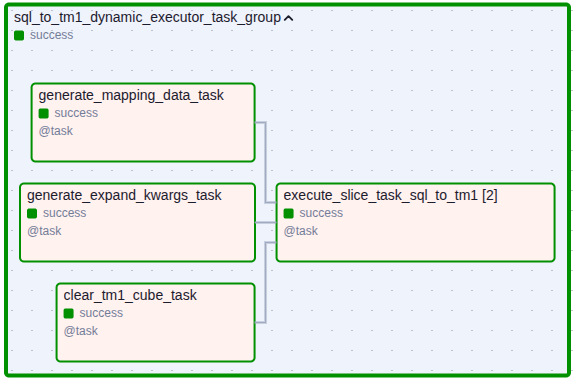
High-level flow example: [metadata prep, target clear, slicing] → Airflow fan-out.
All task groups share the bedrock_params dictionary. Only the keys
referenced below are mandatory; every other Bedrock argument can be passed through the
dictionary and is forwarded as-is to the synchronous helper.
Task Groups
TM1 ↔ TM1 Slice Loader
- tm1_dynamic_executor_task_group(tm1_connection, bedrock_params, dry_run=False, logging_level='INFO')
Moves data between TM1 cubes using
data_copy_intercubewith Airflow-level parallelisation.Key bedrock_params
data_mdx_template (required, string)
This is the workload template for the main MDX query that each worker will execute. It must contain placeholders that match the dimension names from param_set_mdx_list, prefixed with a
$.Example:
SELECT ... FROM [Sales] WHERE ([Period].[$Period], [Version].[$Version])
param_set_mdx_list (required, list[string])
This is the slicing definition. It is a list of MDX set queries that define the parameters for parallelization. Each query should return a set of elements from a single dimension.
Example:
["{[Period].[All Months]}", "{[Version].[Actual,Budget]}"]
target_cube_name (required, string)
The name of the target cube to clear before writing.
target_clear_set_mdx_list (required, list[string])
A list of set MDX lists for clearing the target slices of the input cube.
Example:
["{[Period].[All Months]}", "{[Version].[ForeCast]}"]
Optional
mapping_steps,shared_mapping,use_mixed_datatypes
SQL ↔ TM1 Loaders
- sql_to_tm1_dynamic_executor_task_group(tm1_connection, sql_connection, bedrock_params, dry_run=False, logging_level='INFO')
Streams relational data into TM1. The SQL connection is resolved through
BaseHookand each slice executes its own parametrised SQL template.Key bedrock_params
sql_query_template (required, string)
This is the workload template for the main SQL query that each worker will execute. It must contain placeholders that match the dimension names from param_set_mdx_list, prefixed with a
$.Example:
SELECT ... FROM sales s WHERE s.period = '$Period'
param_set_mdx_list (required, list[string])
This is the slicing definition. It is a list of MDX set queries that define the parameters for parallelization. Each query should return a set of elements from a single dimension.
Example:
["{[Period].[All Months]}", "{[Version].[Actual,Budget]}"]
target_cube_name (required, string)
The name of the target cube to clear before writing.
target_clear_set_mdx_list (required, list[string])
A list of set MDX lists for clearing the target slices of the input cube.
Example:
["{[Period].[All Months]}", "{[Version].[Actual,Budget]}"]
Optional
use_mixed_datatypes, mapping payloads
- tm1_to_sql_dynamic_executor_task_group(tm1_connection, sql_connection, bedrock_params, dry_run=False, logging_level='INFO')
Reads TM1 slices and writes them to a SQL table. Before fan-out, the target table is cleared via
clear_sql_table_task.Key bedrock_params
data_mdx_template (required, string)
This is the workload template for the main MDX query that each worker will execute. It must contain placeholders that match the dimension names from param_set_mdx_list, prefixed with a
$.Example:
SELECT ... FROM [Sales] WHERE ([Period].[$Period], [Version].[$Version])
param_set_mdx_list (required, list[string])
This is the slicing definition. It is a list of MDX set queries that define the parameters for parallelization. Each query should return a set of elements from a single dimension.
Example:
["{[Period].[All Months]}", "{[Version].[Actual,Budget]}"]
target_table_name (required, string)
The name of the target table to write.
sql_delete_statement (optional, string)
Custom SQL delete statement. If missing, then the table is truncated based on
target_table_name.
Optional
related_dimensions,decimal,sql_schema, mapping payloads
CSV ↔ TM1 Loaders
- csv_to_tm1_dynamic_executor_task_group(tm1_connection, bedrock_params, dry_run=False, logging_level='INFO')
Discovers
*.csvfiles belowsource_directoryand processes each file as one Airflow task. Target cube clears and metadata caching mirror the TM1 loaders.Key bedrock_params
target_cube_name (required, string)
The name of the destination cube in TM1.
source_directory (required, string)
The full path to the directory containing the source CSV files to be loaded.
target_clear_set_mdx_list (required, list[string])
A list of set MDX lists for clearing the target slices of the input cube.
Example:
["{[Period].[All Months]}", "{[Version].[Actual,Budget]}"]
Optional
use_mixed_datatypes,decimal,delimiter, mapping payloads
- tm1_to_csv_dynamic_executor_task_group(tm1_connection, bedrock_params, dry_run=False, logging_level='INFO')
Exports TM1 slices to CSV files using
param_set_mdx_listand thetarget_csv_output_dir.Key bedrock_params
data_mdx_template (required, string)
This is the workload template for the main MDX query that each worker will execute. It must contain placeholders that match the dimension names from param_set_mdx_list, prefixed with a
$.Example:
SELECT ... FROM [Sales] WHERE ([Period].[$Period], [Version].[$Version])
param_set_mdx_list (required, list[string])
This is the slicing definition. It is a list of MDX set queries that define the parameters for parallelization. Each query should return a set of elements from a single dimension.
Example:
["{[Period].[All Months]}", "{[Version].[Actual,Budget]}"]
target_csv_output_dir (required, string)
The full path to the directory containing the source CSV files to be loaded.
Optional
decimal,delimiter, mapping payloads
Multi-cube Helper
- copy_cube_data_on_elements(tm1_connection, cube_names, unified_bedrock_params, logging_level='INFO')
Convenience wrapper that expands
unified_bedrock_paramsper cube and spawns individualtm1_dynamic_executor_task_groupinstances (viaTaskGroup.override()) with uniquegroup_idvalues.
Example DAG Snippet
from airflow import DAG
from datetime import datetime
from TM1_bedrock_py.airflow_executor.async_executor import (
    sql_to_tm1_dynamic_executor_task_group,
)

with DAG(
    dag_id="sql_to_tm1_sales",
    start_date=datetime(2024, 1, 1),
    schedule="0 2 * * *",
    catchup=False,
) as dag:
    sql_to_tm1_dynamic_executor_task_group(
        tm1_connection="tm1_prod",
        sql_connection="warehouse",
        logging_level="INFO",
        bedrock_params={
            "target_cube_name": "Sales",
            "param_set_mdx_list": [
                "{[Period].[Period].Children}",
                "{[Version].[Version].['Actual','Budget']}",
            ],
            "sql_query_template": "SELECT * FROM fact_sales WHERE period = '$Period'",
            "target_clear_set_mdx_list": ["{[Period].[$Period]}"],
            "mapping_steps": [...],
            "shared_mapping": {...},
        },
    )
Additional Notes
Every task group honours
dry_run=True, which suppresses TM1/SQL writes and simply logs the slices that would execute.Because Airflow manages concurrency, adjust pool/priority settings on the DAG or tasks instead of altering Python thread counts.
For detailed information about the slice generation and mapping payloads referenced here, consult TM1 / TM1 Parallel Processing Manual, TM1 / SQL Asynchronous Parallel Processing Manual, and TM1 / CSV Asynchronous Parallel Processing Manual.
Warning
Tested Databases
For the 1.1.1 release, this functionality has been explicitly tested against MS SQL Server and PostgreSQL. Behavior with other database backends is yet to be verified.